- Python 98.5%
- Shell 1.5%
| Beacon-S3 | ||
| .DS_Store | ||
| ble_advertising.py | ||
| boot.py | ||
| CLAUDE.md | ||
| flash.sh | ||
| GENERIC_S3-20220618-v1.19.1.bin | ||
| main.py | ||
| mlx90615.py | ||
| name.txt | ||
| README.md | ||
| webrepl_cfg.py | ||

Moody esp32-s3
Code and resources for esp32-s3 implementation of Moody
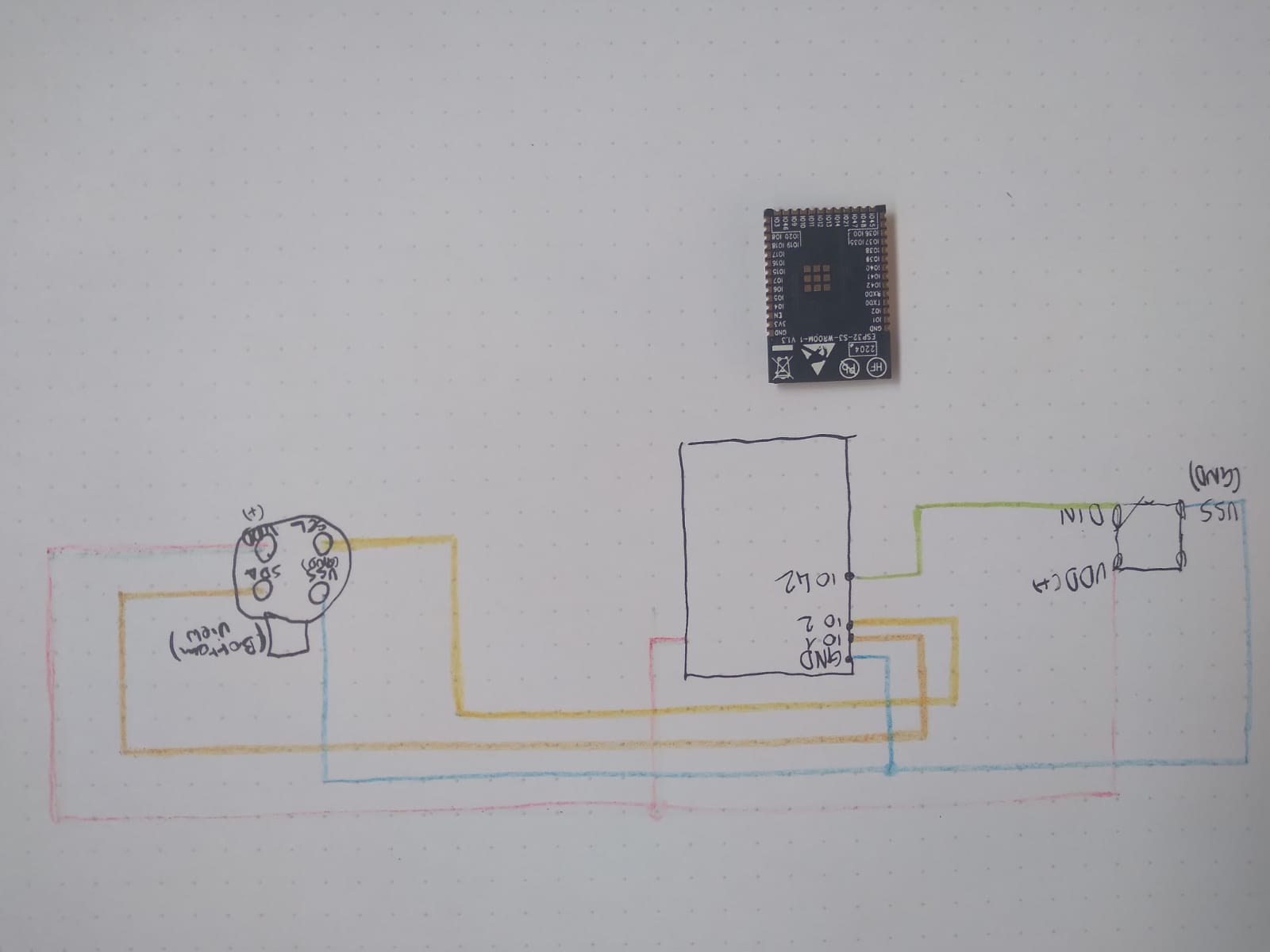
Wiring:
Neopixel din to IO42
Temp SCL to IO2 SDA to IO1
Flashing ESP:
All steps below with python3 environment (tested with python3.9)
Install esptool:
pip install esptool
(https://github.com/espressif/esptool)
Use micropython image in git or download newer: https://micropython.org/download/GENERIC_S3/
Install ampy:
pip install adafruit-ampy
(https://github.com/scientifichackers/ampy)
Connect esp
Script steps:
./flash.sh \<port\> \<moodyID\>
Manual steps:
Delete everything from flash mem:
esptool.py --chip esp32s3 --port /dev/cu.usbserial-016570EF erase_flash
(replace /dev/cu.usbserial-016570EF by whatever port it's connected to)
Flash micropython:
esptool.py --chip esp32s3 --port /dev/cu.usbserial-016570EF write_flash -z 0 GENERIC_S3-20220618-v1.19.1.bin
(replace /dev/cu.usbserial-016570EF by whatever port it's connected to and image path by wherever it is)
Copy files:
ampy --port /dev/cu.usbserial-016570EF --baud 115200 put mlx90615.py
ampy --port /dev/cu.usbserial-016570EF --baud 115200 put webrepl_cfg.py
ampy --port /dev/cu.usbserial-016570EF --baud 115200 put ble_advertising.py
ampy --port /dev/cu.usbserial-016570EF --baud 115200 put main.py
Connect to REPL:
screen /dev/cu.usbserial-016570EF 115200
You should see a promt now.
to run code type demo() (will be adapted to launch automatically)
TODO: ESP IDs & wifi connection (Done)
ESP behaviour
When booted EPS neopixel will turn green.
When a bluetooth connection is established neopixel will turn blue.
ESPs Only try to connect to wifi when booting they flash pink if successful. They connect to:
- SSID: Moody-net
- Pass: ExcitingResearch